360 feedback
360 feedback that shows where views differ
Gain a broader understanding by expanding the reviews to include the perspectives of peers and direct reports. Useful will automatically identify people to request reviews from, or you can name specific people for specific employees.
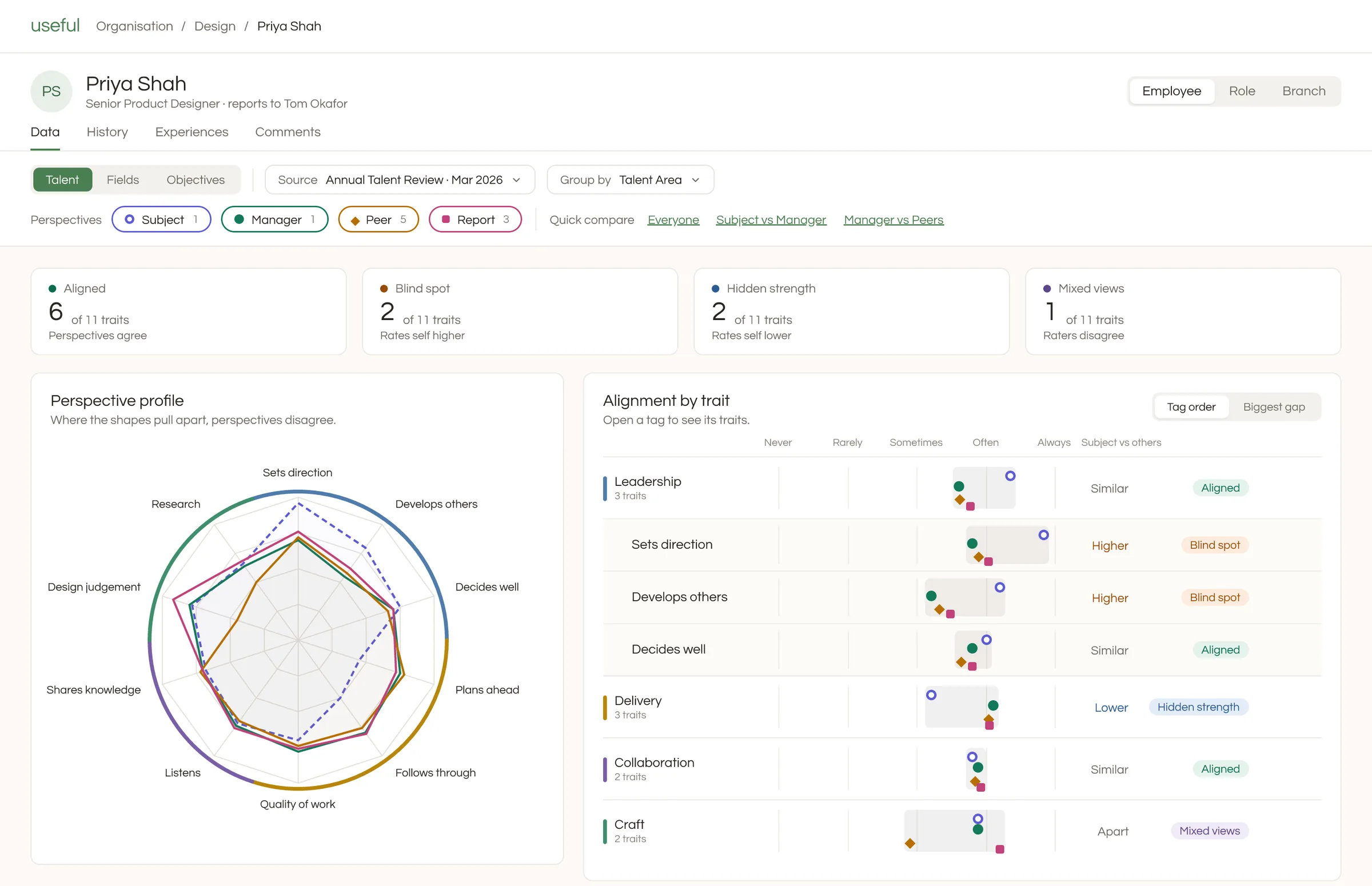
Go beyond the manager's view, if you want to
A manager's rating is often all you need. When you want a fuller picture, add the views of the person, their peers and their reports, review by review. You choose how far each review reaches, and you can keep it to the manager whenever that's enough.
Ask the people who know their work
Peers and reports are asked automatically, based on where each person sits on the org chart, and they can choose whether to answer. You can also name specific reviewers for anyone: a project lead, a client-facing colleague, or a stand-in or additional manager.
Named or anonymous, shared when the manager is ready
Run each review with names shown, or keep peer and report answers anonymous, with nothing shown until at least three people have answered. Nothing reaches the employee until their manager has completed the review and chosen to release it.
Find blind spots and hidden strengths
See where someone rates themselves higher than others do, and where others see strengths they don't recognise in themselves. Compare perspectives side by side, follow how views change from one review to the next, and use what you learn to shape their development.
Spot patterns across a team
Team and branch views compare how people rate themselves with how others rate them, and show how each perspective uses the scale, so you can spot groups that rate generously or harshly.
Identifies blind spots
Help employees understand their growth opportunities by helping them identify blind spots at a glance. Easy-to-understand dashboards show where someone rates themselves higher or lower than others do.
Adapts to the reviewer
Reviews adapt based on the relationship the reviewer has to the subject. So the same review process can capture different data from different perspectives to build a complete picture.
Total control
As with everything in Useful, what gets shared with who is entirely in your hands. Nothing needs to get shared with an employee or their coworkers unless you expressly want it to be.
What you can do
Every feature can be switched on or off, so you only use what you need.
- Compare any two perspectives in one click, such as self and manager
- Easily identify the biggest gaps or the lowest ratings
- See how the perception of an employee changes over time
- Integrate with manager-only talent reviews, or run completely independently
- Define which perspectives are collected on a field by field basis
- Word each question differently for each perspective, with the person's name filled in
- Read written feedback grouped by perspective
Works with the rest of Useful
Questions
How are peers and reports chosen?
From your org chart. Peers share the same manager, and reports are the people who report to them, so nobody has to pick raters by hand.
Are all answers anonymous?
Peer and report answers are. Answers from the person and their manager are not.
Can employees see their own results?
That's your choice, question by question. Each skill, behaviour, experience and question can be shared with the person or kept private, and it's private unless you switch it on. The person sees their manager's answers once the review is complete, and peer and report answers only if their manager chooses to release them.
Can I choose specific reviewers?
Yes. If you want to choose specific people who will be asked to submit reviews, this can easily be set up and changed whenever you like.
Does 360 feedback change someone's place on the 9-box?
No. Talent maps and the org chart use the validated manager rating. 360 answers sit alongside it, so you can see where views differ.
See every perspective in one place
Tell us what you need, and we'll show you how Useful can do it.